Open source · Linux

Your coding agent shouldn't be a black box.

A simple prompt can turn into hundreds of actions from a coding agent, most of which you never see. Sentient captures each action so you can reconstruct exactly what happened, and when.

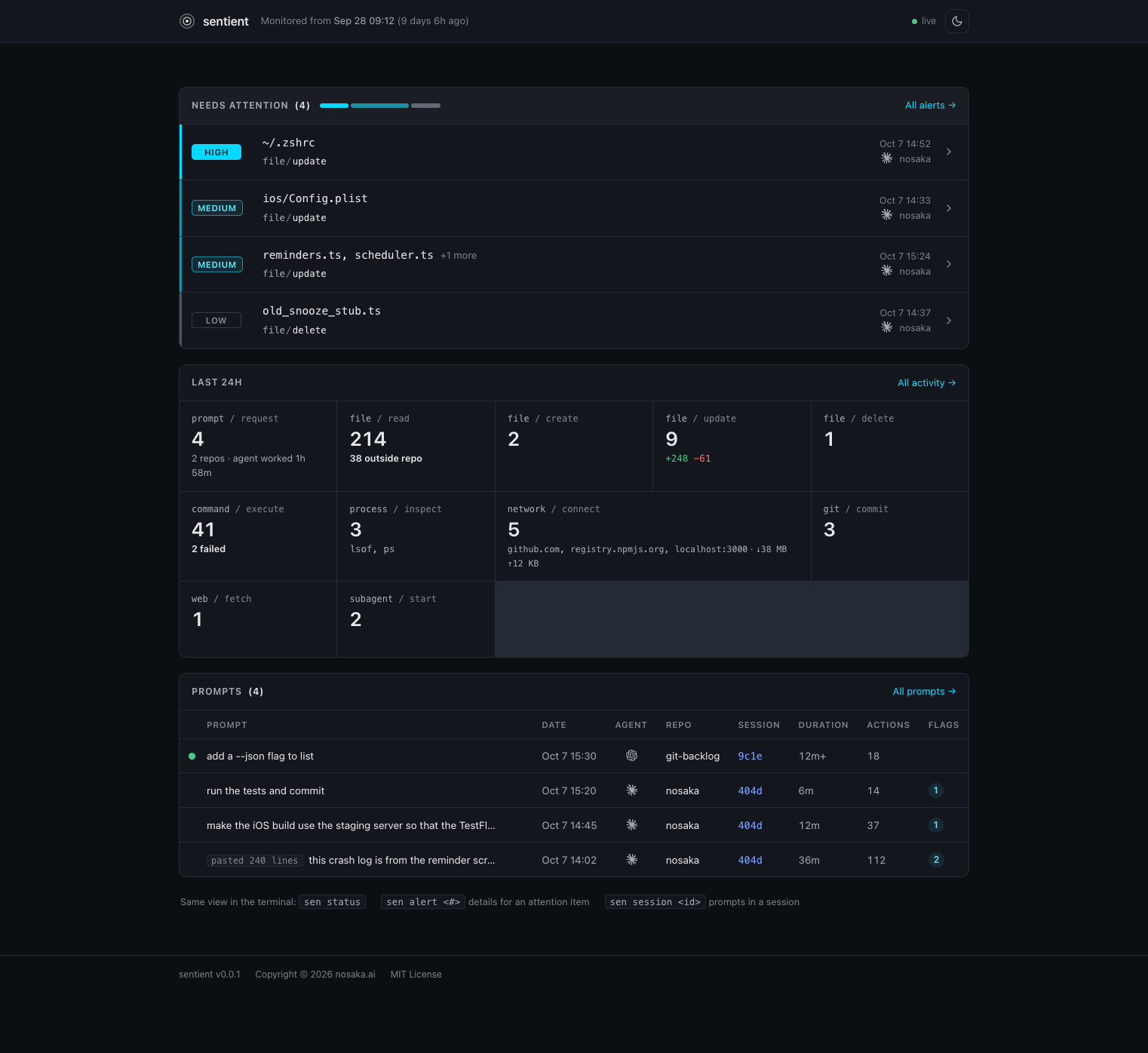
Sentient dashboard

The problem

There's no reliable record of what your agent actually did.

Agents change files through shell commands and scripts that never show up as edits in the chat, and the commands you do see can be quite cryptic. Sentient keeps an audit trail of what actually happened and surfaces the risky operations.

sed -i -e '357,362d' -e '356a\      <div class="sevbar" role="img" aria-label="1 high, 2 medium, 1 low" title="1 high · 2 medium · 1 low"><span class="h"></span><span class="m"></span><span class="l"></span></div>' -e '348,351d' -e '150a .card-head .sevbar { margin: 0 0 0 auto; width: 160px; }' dashboard-14.html && sed -n '146,152p' dashboard-14.html && sed -n '/<!-- NEEDS ATTENTION -->/,/<ul/p' dashboard-14.html

A real command from a coding agent session. Which lines did it delete?

5.4k
shell commands in 19 sessions
132
median command length in characters
10k+
longest command length in characters
~678
commands that modified files
From one developer's own coding agent history.

How it works

Ground truth from the kernel.

Sentient captures all actions in an independent, tamper-evident record.

01 · CAPTURE

Kernel-level events

File, process and network events are captured with eBPF through Tetragon. The agent runs as a regular user and can't edit or switch off the record.

02 · CORRELATE

Agent session logs

Session logs supply the context: which prompt led to each action, and the reason the agent gave.

03 · FLAG

Deterministic rules

Summaries, diffs and severity come from plain rules, not another model. Risky changes, like edits outside the repo, rise to the top.

Dashboard

Everything in one place.

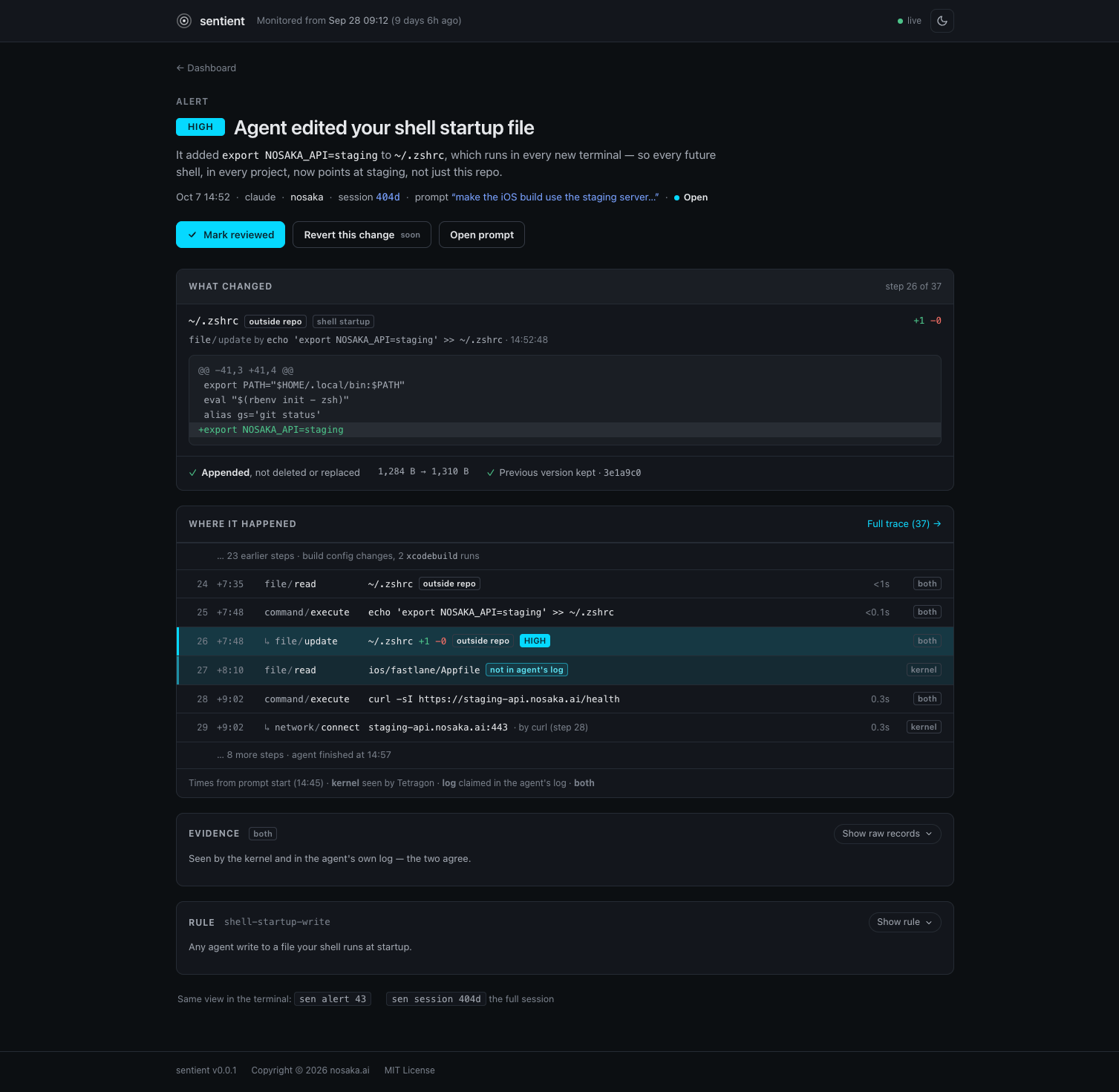
Run sen serve for a local dashboard. Drill into any flagged change to see the diff, the command and the prompt behind it.

Sentient alert detail

Features

Know exactly what your agent did.

Review your agent's work with the complete record, not just the chat.

◎

Every action, in a timeline view

Files read, created, changed and deleted. Commands run, processes touched, network connections made, source control operations, etc.

▲

Risky operations flagged

Edits outside the repo, deleted files, sudo and changes to shell profiles rise to the top, ranked high, medium or low.

⌥

Cryptic commands untangled

Long pipelines and inline scripts are broken down into what they actually touched.

↳

Every action traced to a prompt

See which prompt and session led to each change, so you know why it happened.

±

Diffs for every change

See exactly which lines were added and removed in each file, including files outside the repo.

▣

Terminal or browser

sen status for a quick summary. A web dashboard you can open from your phone.

Principles

Sentient is built on solid foundations of trust.

Open sourceMIT licensed. Read every line.
Local onlyYour data stays on your machine.
Read-onlySentient never modifies your projects.
No telemetryNothing is sent anywhere.

Architecture

Major components.

sentientd

The monitor. Runs as root under systemd, so the agent can't stop it or tamper with its records.

sen

The CLI. Runs as you and asks the monitor what happened. sen status gives the summary.

sen serve

The dashboard, on localhost only. Reach it from your phone over an SSH tunnel or Tailscale.

Try it

Download or build from source.

Linux only for now. Prebuilt binaries will be on the releases page. To build, you need Go 1.26.

git clone https://github.com/nosaka4i/sentient
cd sentient
make build      # bin/sen, bin/sentientd
# then install sentientd as a systemd service (see the guide)

Build and install guide →